





本项目是根据[`清雨飞扬`](https://blog.liushen.fun/posts/c2262998/)的开源项目和自己的小巧思实现的
创建友链信息
在博客根目录创建link.js(如果你在添加友链朋友圈创建过了可无视
添加以下代码:
const YML = require('yamljs')
const fs = require('fs')

const blacklist = ["友站名称1", "友站名称2", "友站名称3"]; // 由于某种原因,不想订阅的列表

let friends = [],
    data_f = YML.parse(fs.readFileSync('source/_data/link.yml').toString().replace(/(?<=rss:)\s*\n/g, ' ""\n'));

data_f.forEach((entry, index) => {
    let lastIndex = 2;
    if (index < lastIndex) {
        const filteredLinkList = entry.link_list.filter(linkItem => !blacklist.includes(linkItem.name));
        friends = friends.concat(filteredLinkList);
    }
});

// 根据规定的格式构建 JSON 数据
const friendData = {
    friends: friends.map(item => {
        return [item.name, item.link, item.avatar];
    })
};

// 将 JSON 对象转换为字符串
const friendJSON = JSON.stringify(friendData, null, 2);

// 写入 friend.json 文件
fs.writeFileSync('./source/friend.json', friendJSON);

console.log('friend.json 文件已生成。');
然后在控制台输入
npm i yamljs --save
node link.js
hexo cl;hexo g;hexo d
复刻github项目
友情链接检测*不要勾选仅复刻main*
- 修改main分支下的config.yml,更改以下内容
  # 友情链接数据源URL
url: "https://你的博客域名/friend.json"- 切换到page分支
删除status.json和error-count.json的数据
cloudflare部署
- 点击左侧的
Workers 和 Pages,再点击创建程序
blue
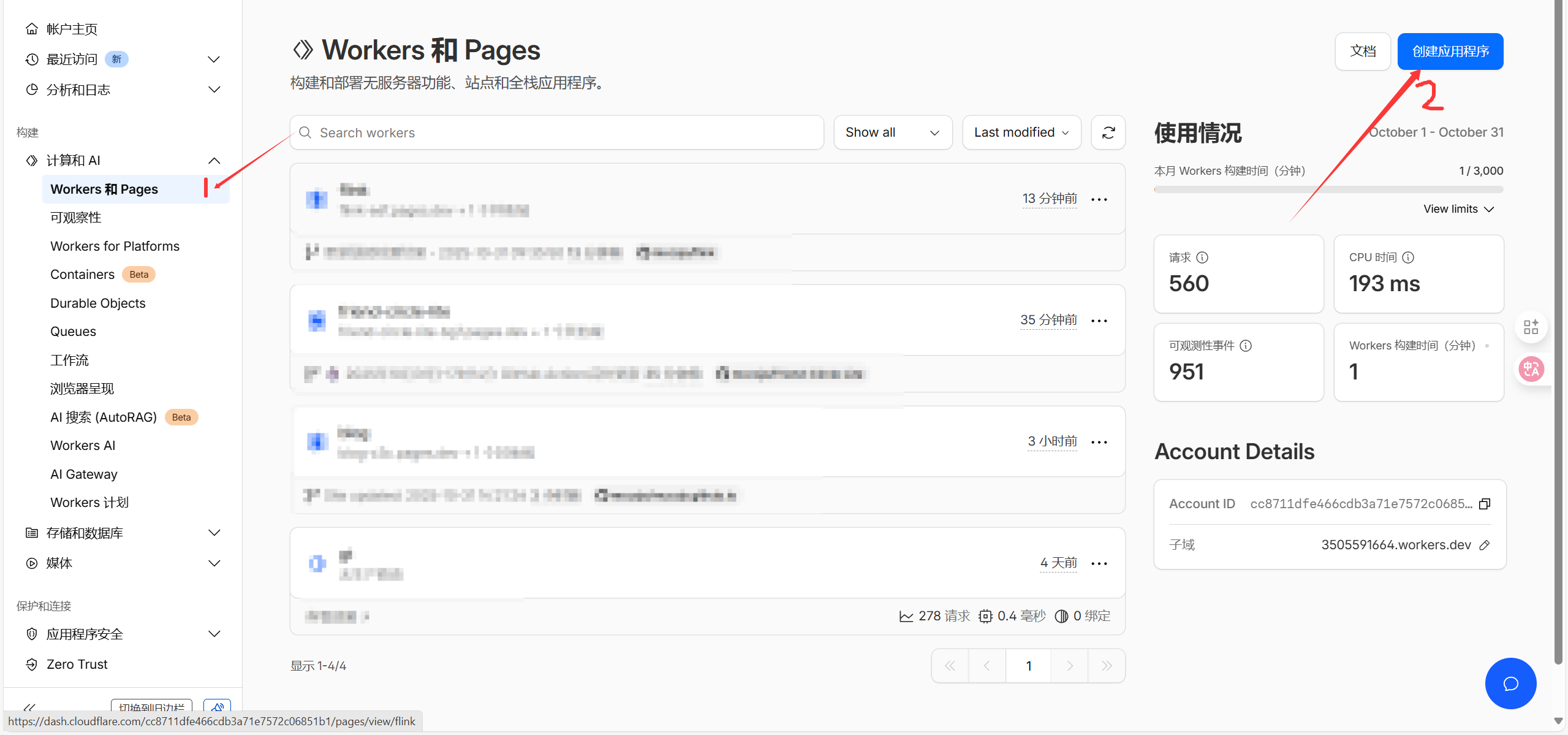
- 点击pages➡️导入现有git➡️选择刚刚fork的库➡️更换生产分支
blue
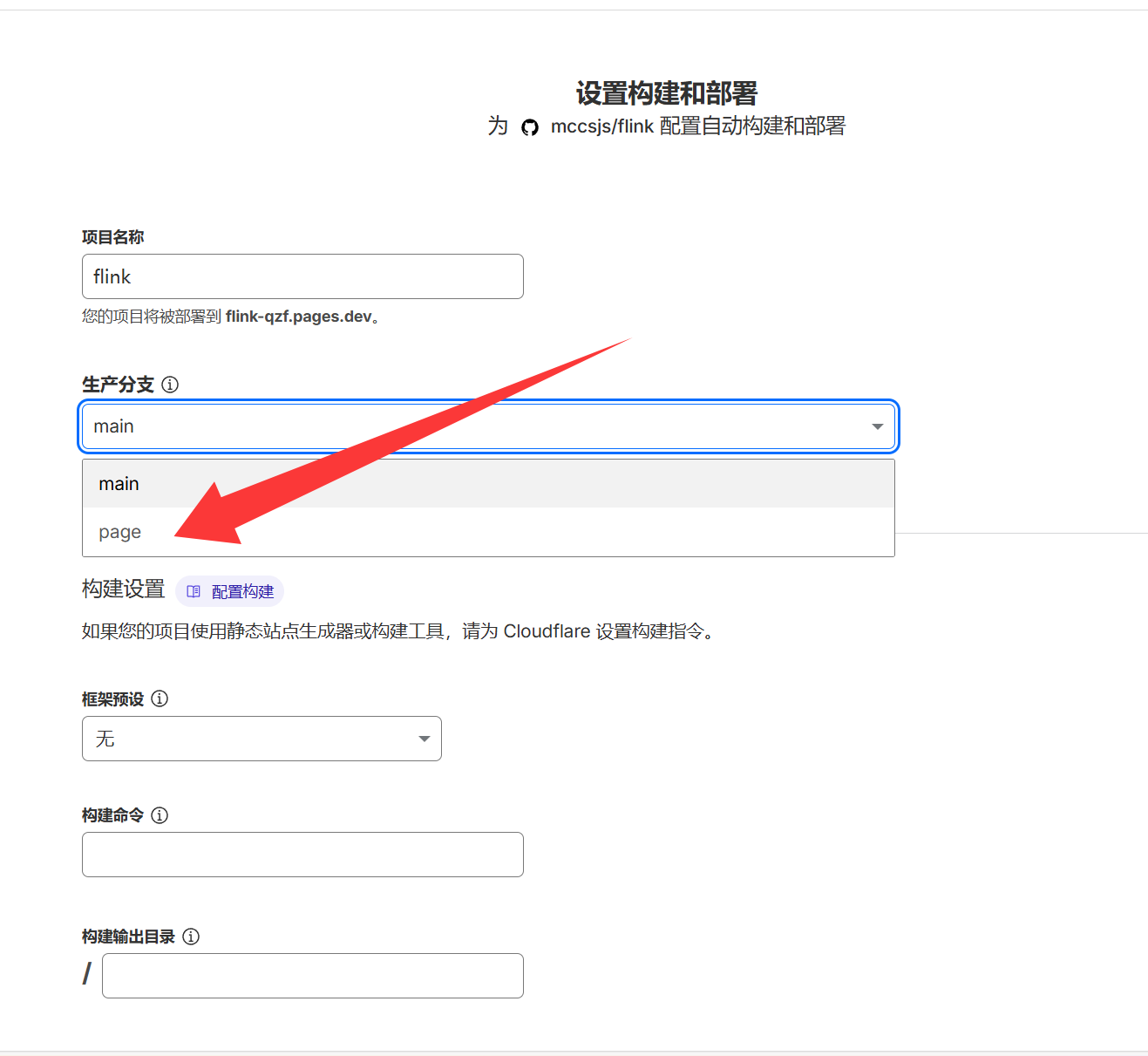
- 绑定域名
使用你绑定后的域名就能使用了
将检测结果显示到友链页
- 创建
source\_data\styles.styl,并填入以下内容
- 因为我出过一期友链样式魔改,本站所使用的是volantis和butterfly两个款式友链,我将提供这两种形式的styl文件
1. butterfly版本
// 友链状态指示器样式
.site-card
  position: relative

.flink-list-item
  position: relative

.site-card-status
  position: absolute
  bottom: 0
  right: 0
  z-index: 10
  padding: 3px 8px
  border-radius: 8px 0 8px 0
  font-size: 12px
  font-weight: 500
  color: #fff
  background-color: rgba(0, 0, 0, 0.6)
  backdrop-filter: blur(4px)
  transition: all 0.3s ease

.site-card-status.status-loading
  background-color: rgba(100, 100, 100, 0.8)
  animation: pulse 1.5s infinite

.site-card-status.status-normal
  background-color: rgba(82, 196, 26, 0.9)

.site-card-status.status-slow
  background-color: rgba(250, 173, 20, 0.9)

.site-card-status.status-error
  background-color: rgba(255, 77, 79, 0.9)

@keyframes pulse
  0%, 100%
    opacity: 1
  50%
    opacity: 0.5

[data-theme="dark"] .site-card-status
  background-color: rgba(255, 255, 255, 0.1)
  color: #fff

[data-theme="dark"] .site-card-status.status-loading
  background-color: rgba(100, 100, 100, 0.8)

[data-theme="dark"] .site-card-status.status-normal
  background-color: rgba(82, 196, 26, 0.8)

[data-theme="dark"] .site-card-status.status-slow
  background-color: rgba(250, 173, 20, 0.8)

[data-theme="dark"] .site-card-status.status-error
  background-color: rgba(255, 77, 79, 0.8)
2. volantis版本
// 友链状态指示器样式 - 只对volantis样式生效
.volantis-flink-list .site-card
  position: relative

.volantis-flink-list .site-card-status
  position: absolute
  top: 4px  // 减小距离
  left: 4px  // 减小距离
  z-index: 10
  padding: 2px 6px  // 减小内边距
  border-radius: 12px  // 稍微减小圆角
  font-size: 10px  // 缩小字体
  font-weight: 600
  color: #fff
  background-color: rgba(0, 0, 0, 0.35)
  backdrop-filter: blur(8px)
  -webkit-backdrop-filter: blur(8px)
  border: 1px solid rgba(255, 255, 255, 0.1)
  transition: all 0.3s ease
  min-width: 24px  // 确保最小宽度
  text-align: center
  box-sizing: border-box
  line-height: 1.2

// 加载中状态
.volantis-flink-list .site-card-status.status-loading
  background-color: rgba(100, 100, 100, 0.5)
  animation: pulse 1.5s infinite

// 正常状态
.volantis-flink-list .site-card-status.status-normal
  background-color: rgba(82, 196, 26, 0.5)

// 缓慢状态
.volantis-flink-list .site-card-status.status-slow
  background-color: rgba(250, 173, 20, 0.5)

// 错误状态
.volantis-flink-list .site-card-status.status-error
  background-color: rgba(255, 77, 79, 0.5)

// 加载动画
@keyframes pulse
  0%, 100%
    opacity: 1
  50%
    opacity: 0.7

// 深色主题适配
[data-theme="dark"] .volantis-flink-list .site-card-status
  background-color: rgba(255, 255, 255, 0.15)
  color: #fff
  border: 1px solid rgba(255, 255, 255, 0.2)

[data-theme="dark"] .volantis-flink-list .site-card-status.status-loading
  background-color: rgba(100, 100, 100, 0.6)

[data-theme="dark"] .volantis-flink-list .site-card-status.status-normal
  background-color: rgba(82, 196, 26, 0.6)

[data-theme="dark"] .volantis-flink-list .site-card-status.status-slow
  background-color: rgba(250, 173, 20, 0.6)

[data-theme="dark"] .volantis-flink-list .site-card-status.status-error
background-color: rgba(255, 77, 79, 0.6)- 在
source\js中创建links.js,填入以下代码
- 这里也提供两种版本
1. butterfly版本
// Butterfly主题友链状态检测脚本 - 适配提供的CSS样式
class LinkStatusChecker {
  constructor() {
    this.retryCount = 0;
    this.MAX_RETRIES = 3;
    this.STATUS_URL = 'https://你给检测项目绑定的域名/status.json';
    this.init();
  }

  init() {
    // 等待Butterfly主题的友链卡片加载完成
    if (this.hasLinkCards()) {
      this.injectStatusIndicators();
      this.fetchAndUpdateStatus();
    } else {
      // 如果友链容器还没加载,等待一下
      setTimeout(() => this.init(), 100);
    }
  }

  hasLinkCards() {
    return document.querySelector('.flink-list') ||
           document.querySelector('.site-card') ||
           document.querySelector('.flink-list-item');
  }

  // 为每个友链卡片注入状态指示器
  injectStatusIndicators() {
    // 尝试多种选择器以适应不同版本的Butterfly主题
    const linkSelectors = [
      '.flink-list .flink-list-item',
      '.flink-list-item',
      '.site-card',
      '.friend-link-item'
    ];

    let linkCards = [];

    for (const selector of linkSelectors) {
      const cards = document.querySelectorAll(selector);
      if (cards.length > 0) {
        linkCards = cards;
        break;
      }
    }

    linkCards.forEach(card => {
      // 检查是否已经添加了状态指示器
      if (card.querySelector('.site-card-status')) {
        return;
      }

      const linkElement = card.querySelector('a');
      if (!linkElement) return;

      // 获取链接名称 - 适配Butterfly主题的不同结构
      let linkName = '';
      const nameSelectors = [
        '.flink-item-name',
        '.site-name',
        '.friend-name',
        'h2', 'h3', 'h4',
        '.card-title',
        'span'
      ];

      for (const selector of nameSelectors) {
        const nameEl = card.querySelector(selector);
        if (nameEl && nameEl.textContent.trim()) {
          linkName = nameEl.textContent.trim();
          break;
        }
      }

      // 如果还是没找到,使用链接文本
      if (!linkName) {
        linkName = linkElement.textContent.trim() ||
                   linkElement.getAttribute('title') ||
                   '未知网站';
      }

      const linkUrl = linkElement.href;

      // 创建状态指示器 - 使用你提供的CSS类名
      const statusEl = document.createElement('div');
      statusEl.className = 'site-card-status status-loading';
      statusEl.setAttribute('data-name', linkName);
      statusEl.setAttribute('data-url', linkUrl);
      statusEl.textContent = '检测中...';

      // 添加到卡片中
      card.appendChild(statusEl);

      // 确保卡片有相对定位
      if (getComputedStyle(card).position === 'static') {
        card.style.position = 'relative';
      }
    });
  }

  async fetchLinkStatus() {
    const response = await fetch(this.STATUS_URL);
    if (!response.ok) {
      throw new Error('网络请求失败');
    }
    return await response.json();
  }

  updateLinkStatus(data) {
    if (data && data.link_status) {
      const statusMap = {};
      data.link_status.forEach(link => {
        statusMap[link.name] = link;
      });

      // 更新每个链接的状态
      const statusElements = document.querySelectorAll('.site-card-status');
      statusElements.forEach(el => {
        const linkName = el.getAttribute('data-name');
        if (statusMap[linkName]) {
          const status = statusMap[linkName];
          this.updateStatusElement(el, status);
        } else {
          // 如果没有找到对应的状态数据,标记为错误
          this.updateStatusElement(el, { success: false, latency: -1 });
        }
      });
    } else {
      throw new Error('无效的状态数据');
    }
  }

  updateStatusElement(element, status) {
    let statusClass = '';
    let statusText = '';

    if (!status.success || status.latency === -1) {
      statusClass = 'status-error';
      const errorCount = status.error_count || 0;
      statusText = "异常[" + errorCount + "]";
    } else {
      const latency = status.latency;
      if (latency <= 3) {
        statusClass = 'status-normal';
      } else {
        statusClass = 'status-slow';
      }
      statusText = latency + 's';
    }

    element.className = 'site-card-status ' + statusClass;
    element.textContent = statusText;
  }

  handleError() {
    this.retryCount++;
    if (this.retryCount <= this.MAX_RETRIES) {
      console.log(`状态检测失败,第${this.retryCount}次重试...`);
      setTimeout(() => this.fetchAndUpdateStatus(), 2000 * this.retryCount);
    } else {
      // 将所有状态设为错误
      document.querySelectorAll('.site-card-status.status-loading').forEach(el => {
        el.className = 'site-card-status status-error';
        el.textContent = '获取失败';
      });
    }
  }

  async fetchAndUpdateStatus() {
    try {
      const data = await this.fetchLinkStatus();
      this.updateLinkStatus(data);
    } catch (error) {
      console.error('获取友链状态失败:', error);
      this.handleError();
    }
  }
}

// 添加你提供的CSS样式
const addLinkStatusStyles = () => {
  // 检查是否已经添加了样式
  if (document.querySelector('#link-status-styles')) {
    return;
  }

  const css = `
.site-card {
	position: relative
}

.flink-list-item {
	position: relative
}

.site-card-status {
	position: absolute;
	bottom: 0;
	right: 0;
	z-index: 10;
	padding: 3px 8px;
	border-radius: 8px 0 8px 0;
	font-size: 12px;
	font-weight: 500;
	color: #fff;
	background-color: rgba(0, 0, 0, 0.6);
	backdrop-filter: blur(4px);
	transition: all 0.3s ease
}

.site-card-status.status-loading {
	background-color: rgba(100, 100, 100, 0.8);
	animation: pulse 1.5s infinite
}

.site-card-status.status-normal {
	background-color: rgba(82, 196, 26, 0.9)
}

.site-card-status.status-slow {
	background-color: rgba(250, 173, 20, 0.9)
}

.site-card-status.status-error {
	background-color: rgba(255, 77, 79, 0.9)
}

@keyframes pulse {

	0%,
	100% {
		opacity: 1
	}

	50% {
		opacity: 0.5
	}
}

[data-theme="dark"] .site-card-status {
	background-color: rgba(255, 255, 255, 0.1);
	color: #fff
}

[data-theme="dark"] .site-card-status.status-loading {
	background-color: rgba(100, 100, 100, 0.8)
}

[data-theme="dark"] .site-card-status.status-normal {
	background-color: rgba(82, 196, 26, 0.8)
}

[data-theme="dark"] .site-card-status.status-slow {
	background-color: rgba(250, 173, 20, 0.8)
}

[data-theme="dark"] .site-card-status.status-error {
	background-color: rgba(255, 77, 79, 0.8)
}

.flink-templates {
	margin-top: 2rem;
	padding: 1.5rem;
	background: var(--efu-card-bg);
	border-radius: 12px;
	border: var(--style-border-always);
	box-shadow: var(--efu-shadow-border)
}

.flink-templates h3 {
	margin-bottom: 1rem;
	font-size: 1.2rem;
	font-weight: 600;
	color: var(--efu-fontcolor)
}

.template-buttons {
	display: flex;
	gap: 1rem;
	flex-wrap: wrap
}

.template-btn {
	display: flex;
	align-items: center;
	gap: 0.5rem;
	padding: 0.75rem 1.5rem;
	border: none;
	border-radius: 8px;
	font-size: 14px;
	font-weight: 500;
	cursor: pointer;
	transition: all 0.3s ease;
	background: var(--efu-theme);
	color: #fff
}

.template-btn:hover {
	transform: translateY(-2px);
	box-shadow: 0 4px 12px rgba(0, 0, 0, 0.15)
}

.template-btn i {
	font-size: 16px
}

.template-btn.markdown-btn {
	background: #10b981
}

.template-btn.markdown-btn:hover {
	background: #059669
}

[data-theme="dark"] .flink-templates {
	background: var(--efu-card-bg);
	border-color: var(--efu-border)
}

[data-theme="dark"] .template-btn {
	background: var(--efu-theme)
}

[data-theme="dark"] .template-btn.markdown-btn {
	background: #10b981
}
`;

  const style = document.createElement('style');
  style.id = 'link-status-styles';
  style.textContent = css;
  document.head.appendChild(style);
};

// 初始化
document.addEventListener('DOMContentLoaded', () => {
  addLinkStatusStyles();
  new LinkStatusChecker();
});

// 支持PJAX重新加载
document.addEventListener('pjax:complete', () => {
  new LinkStatusChecker();
});

// 监听主题切换事件(如果Butterfly主题支持动态主题切换)
document.addEventListener('themechange', () => {
  // 重新应用样式以确保深色主题正确
  addLinkStatusStyles();
});
2. volantis版本
// 友链状态检测脚本 - 只对volantis样式生效,状态显示在左上角
class LinkStatusChecker {
  constructor() {
    this.retryCount = 0;
    this.MAX_RETRIES = 3;
    this.STATUS_URL = 'https://你给检测项目绑定的域名/status.json';
    this.init();
  }

  init() {
    // 只等待volantis样式的友链卡片加载完成
    if (this.hasVolantisLinkCards()) {
      this.injectStatusIndicators();
      this.fetchAndUpdateStatus();
    } else {
      // 如果volantis友链容器还没加载,等待一下
      setTimeout(() => this.init(), 100);
    }
  }

  hasVolantisLinkCards() {
    // 只检测volantis样式的友链容器
    return document.querySelector('.volantis-flink-list');
  }

  // 为volantis样式的友链卡片注入状态指示器
  injectStatusIndicators() {
    // 只选择volantis样式容器内的卡片
    const linkCards = document.querySelectorAll('.volantis-flink-list .site-card');

    linkCards.forEach(card => {
      // 检查是否已经添加了状态指示器
      if (card.querySelector('.site-card-status')) {
        return;
      }

      const linkElement = card;
      if (!linkElement) return;

      // 获取链接名称 - 适配volantis样式的结构
      let linkName = '';
      const nameEl = card.querySelector('.info .title');
      if (nameEl && nameEl.textContent.trim()) {
        linkName = nameEl.textContent.trim();
      }

      // 如果还是没找到,使用备用方法
      if (!linkName) {
        linkName = card.querySelector('.title')?.textContent.trim() ||
                   card.getAttribute('title') ||
                   '未知网站';
      }

      const linkUrl = card.href;

      // 创建状态指示器
      const statusEl = document.createElement('div');
      statusEl.className = 'site-card-status status-loading';
      statusEl.setAttribute('data-name', linkName);
      statusEl.setAttribute('data-url', linkUrl);
      statusEl.textContent = '检测中...';

      // 添加到卡片中
      card.appendChild(statusEl);

      // 确保卡片有相对定位
      if (getComputedStyle(card).position === 'static') {
        card.style.position = 'relative';
      }
    });
  }

  async fetchLinkStatus() {
    const response = await fetch(this.STATUS_URL);
    if (!response.ok) {
      throw new Error('网络请求失败');
    }
    return await response.json();
  }

  updateLinkStatus(data) {
    if (data && data.link_status) {
      const statusMap = {};
      data.link_status.forEach(link => {
        statusMap[link.name] = link;
      });

      // 更新每个链接的状态
      const statusElements = document.querySelectorAll('.site-card-status');
      statusElements.forEach(el => {
        const linkName = el.getAttribute('data-name');
        if (statusMap[linkName]) {
          const status = statusMap[linkName];
          this.updateStatusElement(el, status);
        } else {
          // 如果没有找到对应的状态数据,标记为错误
          this.updateStatusElement(el, { success: false, latency: -1 });
        }
      });
    } else {
      throw new Error('无效的状态数据');
    }
  }

  updateStatusElement(element, status) {
    let statusClass = '';
    let statusText = '';

    if (!status.success || status.latency === -1) {
      statusClass = 'status-error';
      const errorCount = status.error_count || 0;
      statusText = "异常[" + errorCount + "]";
    } else {
      const latency = status.latency;
      if (latency <= 3) {
        statusClass = 'status-normal';
      } else {
        statusClass = 'status-slow';
      }
      statusText = latency + 's';
    }

    element.className = 'site-card-status ' + statusClass;
    element.textContent = statusText;
  }

  handleError() {
    this.retryCount++;
    if (this.retryCount <= this.MAX_RETRIES) {
      console.log(`状态检测失败,第${this.retryCount}次重试...`);
      setTimeout(() => this.fetchAndUpdateStatus(), 2000 * this.retryCount);
    } else {
      // 将所有状态设为错误
      document.querySelectorAll('.site-card-status.status-loading').forEach(el => {
        el.className = 'site-card-status status-error';
        el.textContent = '获取失败';
      });
    }
  }

  async fetchAndUpdateStatus() {
    try {
      const data = await this.fetchLinkStatus();
      this.updateLinkStatus(data);
    } catch (error) {
      console.error('获取友链状态失败:', error);
      this.handleError();
    }
  }
}

// 添加CSS样式 - 只针对volantis样式,状态显示在左上角
const addLinkStatusStyles = () => {
  // 检查是否已经添加了样式
  if (document.querySelector('#link-status-styles')) {
    return;
  }

  const css = `
/* 只对volantis样式的友链生效,状态显示在左上角 */
.volantis-flink-list .site-card {
  position: relative;
}

.volantis-flink-list .site-card-status {
  position: absolute;
  top: 0;
  left: 0;
  z-index: 10;
  padding: 3px 8px;
  border-radius: 0 0 8px 0; /* 左上角圆角改为右下角圆角,因为现在在左上角 */
  font-size: 12px;
  font-weight: 500;
  color: #fff;
  background-color: rgba(0, 0, 0, 0.6);
  backdrop-filter: blur(4px);
  transition: all 0.3s ease;
}

.volantis-flink-list .site-card-status.status-loading {
  background-color: rgba(100, 100, 100, 0.8);
  animation: pulse 1.5s infinite;
}

.volantis-flink-list .site-card-status.status-normal {
  background-color: rgba(82, 196, 26, 0.9);
}

.volantis-flink-list .site-card-status.status-slow {
  background-color: rgba(250, 173, 20, 0.9);
}

.volantis-flink-list .site-card-status.status-error {
  background-color: rgba(255, 77, 79, 0.9);
}

@keyframes pulse {
  0%, 100% {
    opacity: 1;
  }
  50% {
    opacity: 0.5;
  }
}

[data-theme="dark"] .volantis-flink-list .site-card-status {
  background-color: rgba(255, 255, 255, 0.1);
  color: #fff;
}

[data-theme="dark"] .volantis-flink-list .site-card-status.status-loading {
  background-color: rgba(100, 100, 100, 0.8);
}

[data-theme="dark"] .volantis-flink-list .site-card-status.status-normal {
  background-color: rgba(82, 196, 26, 0.8);
}

[data-theme="dark"] .volantis-flink-list .site-card-status.status-slow {
  background-color: rgba(250, 173, 20, 0.8);
}

[data-theme="dark"] .volantis-flink-list .site-card-status.status-error {
  background-color: rgba(255, 77, 79, 0.8);
}
`;

  const style = document.createElement('style');
  style.id = 'link-status-styles';
  style.textContent = css;
  document.head.appendChild(style);
};

// 初始化
document.addEventListener('DOMContentLoaded', () => {
  addLinkStatusStyles();
  new LinkStatusChecker();
});

// 支持PJAX重新加载
document.addEventListener('pjax:complete', () => {
  new LinkStatusChecker();
});

// 监听主题切换事件
document.addEventListener('themechange', () => {
  addLinkStatusStyles();
});
大功告成
至此已全部修改完成,本站只使用volantis版,所以里面的小巧思更多点,用butterfly版本只能复制让ai完善个人的小巧思了。完成预览:
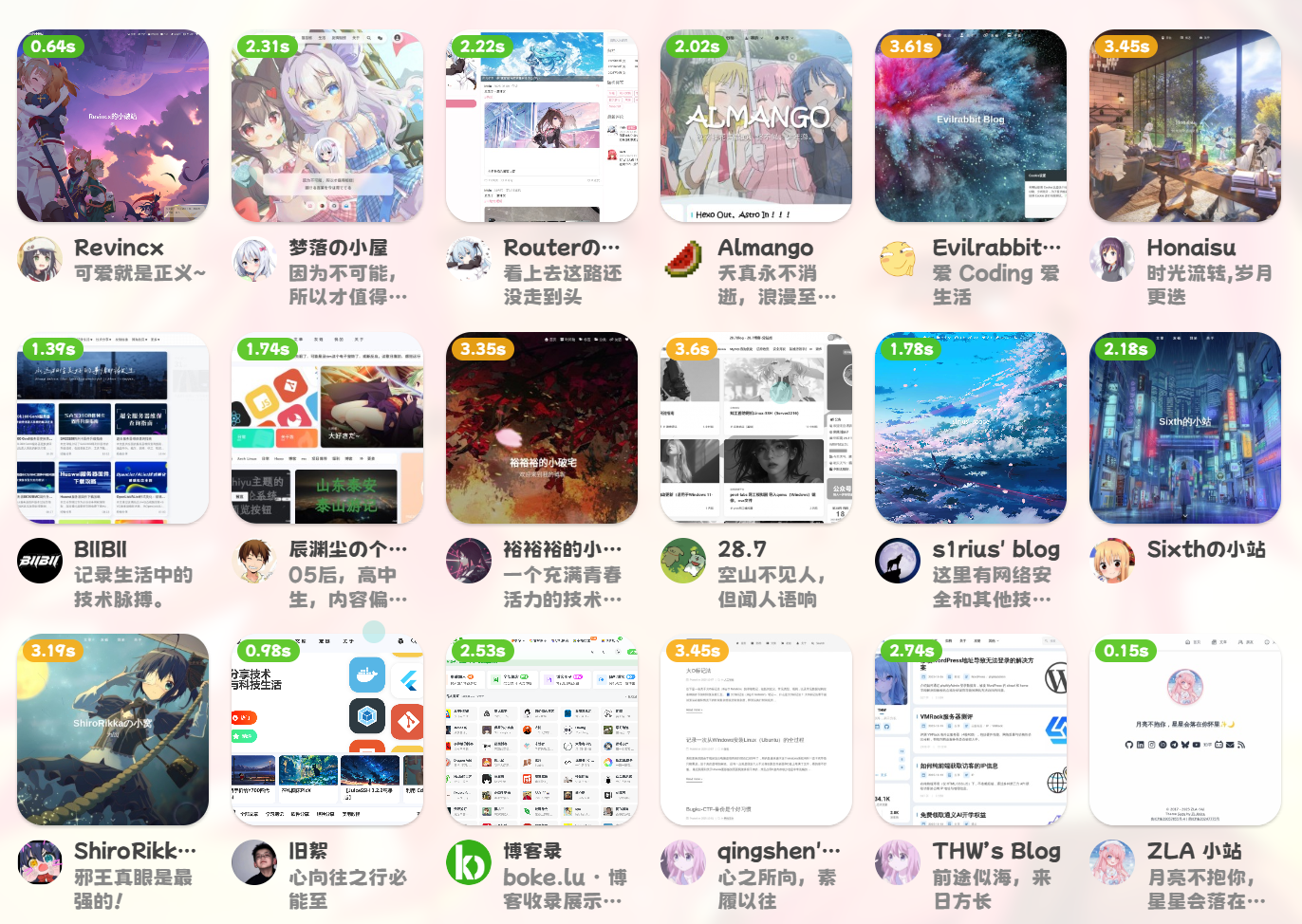
更新这篇文章主要是发现我在逐渐忘记这部分魔改,赶紧得保存下来🤣
如果要更新友链信息那就在控制台执行
node link.js最后hexo三连看看效果
hexo cl;hexo g;hexo d下一期预告:魔改about页面,实现anzhiyu同款